dbcli commands crib sheet


cd /opt/oracle/dcs/bin


./dbcli list-dbhomes
./dbcli describe-component
./dbcli list-databases -j
./dbcli describe-database -in <db_name>
./dbcli list-jobs -f `date --date='-3 day' '+%Y-%m-%d'`
./dbcli list-jobs|grep -i <dbname>
./dbcli list-jobs | tail
not the last job ID listed with a status other than success
with the job ID you noted above check the details of that jobs

./dbcli list-jobs | grep 'Failure'
./describe-job -i <id of failed job>
./dbcli describle-job -i <job_ID> -j
./dbcli describe-job -i <failed_job_id> -l Verbose

Performance issues on different nodes in RAC cluster - SQL execution plan

So query runs on node 1 - generates a fast query plan which is then cached - large load takes place meaning stats are out of date. 

Query runs on node 2 generates a terrible plan. - meaning node1 still has a fast query plan cached - so node 1 ok node 2 terrible.

Possible option run tuning advisor in OEM on the inconsistent sql id and pick the good execution plan from the correct node.

Found this website - 

Copy SQL Execution Plans Between Databases in Oracle 19c

So using the website above - didn't need to move between databases but used to fix the execution plan.

e.g. (random sql for demo purpose)

select * from C29R2.IMPORT_EXPORT_ERRORS where EXTERNAL_REF like '%Cowie%';

70904 LJS_S85362-1_Cowie 1 PRN

SQL> explain plan for

select * from C29R2.IMPORT_EXPORT_ERRORS where EXTERNAL_REF like '%Cowie%'

Explained.

SQL> SELECT *FROM table(DBMS_XPLAN.DISPLAY (FORMAT=>'ALL +OUTLINE'));

Plan hash value: 3531643812
--------------------------------------------------------------------------------
| Id | Operation | Name | Rows | Bytes | Cost (%CPU)|

….etc

Find the sql_id for the inconsistent sql - 

SQL> select sql_text, sql_id, LAST_ACTIVE_TIME from v$sqlarea where sql_text like '%EXTERNAL_REF%' order by 3
2 /

SQL_TEXT SQL_ID LAST_ACTI
------------------------------------------------------------------------------- ------------- ---------
select * from C29R2.IMPORT_EXPORT_ERRORS where EXTERNAL_REF like '%Cowie%' 

gtkddvj5y9skn 20-FEB-25


SQL> SELECT DISTINCT plan_hash_value FROM v$sql WHERE sql_id = 'gtkddvj5y9skn'
SQL> /

PLAN_HASH_VALUE
---------------
3531643812


SQL> DECLARE
set binary_integer;
BEGIN
ret := DBMS_SPM.LOAD_PLANS_FROM_CURSOR_CACHE(
sql_id => 'gtkddvj5y9skn',
plan_hash_value => 3531643812,
fixed => 'YES',
enabled => 'YES'
);
END; 

PL/SQL procedure successfully completed.

SQL> SELECT sql_handle, plan_name FROM dba_sql_plan_baselines;

SQL_HANDLE PLAN_NAME
------------------------------ ---------------------------------
SQL_0653a496ce0872e7 SQL_PLAN_0cnx4kv70hwr7c58fda78


Upgrading a single PDB to use a new DST file

(Credit to Mike C. for these notes)

When trying to refresh a db which was at a db level 2 below Prod I received the error below.

ORA-39002: invalid operation

ORA-39405: Oracle Data Pump does not support importing from a source database with TSTZ version 41 into a target database with TSTZ version 39.

This is the first time I’ve tried to refresh Dev from Prod. Test is more in step with Prod so wasn’t a problem.

Prod is at 19.19 but that’s not available from the console anymore.

I created a new Dev at 19.23 and that did allow me to do an import however I didn’t really want to replace the original db system, although would have done if no other choice.

I upgraded Dev to 19.23 but suspected there’d be more work to do before an import could be done and so it proved.

Although general db patching does make the new DST files available it doesn’t set them in the CDB or PDB so the actions below were still required.

If I hadn’t patched to 19.23 I could have applied a DST patch (p35099667_190000_Linux-x86-64.zip ) using opatch to apply the files but this still would have needed the below. (think of the below as datapatch after patching)

The below can be done on individual PDB’s or the container. I’ve just done it on LIMSD pdb as that’s all we’ll use this for. Also I did it on a new temp empty PDB which would be cloned over LIMSD so as not to worry about user table upgrading. I was doing an import anyway.

Check which DST files are now available after upgrade or DST patch.

ls -l /u01/app/oracle/product/19.0.0.0/dbhome_1/oracore/zoneinfo

Check which file is set in the db.

SQL> SELECT version FROM v$timezone_file;

VERSION
----------
39

Put pdb into upgrade mode

alter pluggable database PDB1 close immediate;

alter pluggable database PDB1 open upgrade;

alter session set container=PDB1;


Start an upgrade window

begin

dbms_dst.begin_upgrade

( new_version => 41,
error_on_overlap_time => false,
error_on_nonexisting_time => false
);

end;


Restart the db normally

alter pluggable database PDB2 close immediate;

alter pluggable database PDB2 open;


Start the upgrade


SQL> declare

failures binary_integer := -1;

begin

dbms_dst.upgrade_database

( num_of_failures => failures,

upgrade_data => false,

error_on_overlap_time => false,

error_on_nonexisting_time => false

);

end; 

End the upgrade

SQL> declare

failures binary_integer := -1;

begin

dbms_dst.end_upgrade(num_of_failures => failures);

end; 

PL/SQL procedure successfully completed.


Check again which file is set in the db.

SQL> SELECT version FROM v$timezone_file;

VERSION
----------
41

DP import should now work in this PDB.


SCAN Listener info

Have not touched scan listeners for ages so some very quick background commands to show scan listener info. That long took me ages to remember this so hence the note.

[oracle@dbb1 admin]$ srvctl config scan

[oracle@dbb1 admin]$ srvctl config scan_listener

[oracle@dbb1 admin]$ srvctl status scan_listener

from the above - 
(ip addresses randomised)

[oracle@dbb1 admin]$ nslookup dbb-scan.s002.ldn.oraclevcn.com

Non-authoritative answer:

Name: dbb-scan.s002.ldn.oraclevcn.com
Address: 10.157.196.159
Name: dbb-scan.s002.ldn.oraclevcn.com
Address: 10.157.196.141
Name: dbb-scan.s002.ldn.oraclevcn.com
Address: 10.157.196.230

Run again - the ip addresses will change i.e order first node "hits" second node

[oracle@dbb1 admin]$ nslookup dbb-scan.s002.ldn.oraclevcn.com

Non-authoritative answer:
Name: dbb-scan.s002.ldngisprd.oraclevcn.com
Address: 10.157.196.141
Name: dbb-scan.s002.ldngisprd.oraclevcn.com
Address: 10.157.196.230
Name: dbb-scan.s002.ldngisprd.oraclevcn.com
Address: 10.157.196.159

Run "ip a" to see ip address info at unix level

[oracle@prdg2gis-dbb1 admin]$ ip a


Monitoring Autonomous Databases


Recently had a connection issue with Apex via an autonomous database build. Raised an SR with Oracle and was fixed pretty quick.

Since no server backend, only option is to use sqlplus to read the alert log, this worked :

SELECT ORIGINATING_TIMESTAMP, MESSAGE_LEVEL, MESSAGE_TEXT, PROBLEM_KEY
FROM V$DIAG_ALERT_EXT
WHERE MESSAGE_TEXT LIKE '%ORA-%' AND ORIGINATING_TIMESTAMP > sysdate-7
ORDER BY ORIGINATING_TIMESTAMP DESC;


Adjust as approp. Will add more to this post as time goes on.

Autonomous database - database link

Quick notes on creating a database link in an autonomous database.

Please note, 1521/tcp can be used for the connection and a tcps connection is only needed for a connection to a database with a public endpoint. Spent an ages trying to setup a tcps connection using a wallet (battle for another day) when figured 1521 would suffice. On searching the web, lots of sites mentioning tcps but for the database I was connecting to 1521 worked fine. Just create the credential and the link. 

BEGIN
DBMS_CLOUD.CREATE_CREDENTIAL(
credential_name => 'TEST_CRED',
username => 'TESTUSER',
password => 'pass123'
);
END;

BEGIN
DBMS_CLOUD_ADMIN.CREATE_DATABASE_LINK(
db_link_name => 'TEST_LINK',
hostname => 'test-dbs.oci.test.co.uk',
port => '1521',
service_name => ''test2.s003.ldntiertest.oraclevcn.com,
ssl_server_cert_dn => NULL,
credential_name => 'TEST_CRED',
directory_name => NULL,
public_link => TRUE,
private_target => TRUE);
END;

PL/SQL multi values example


Wanted to compare a sequence value with a max value in a corresponding table.

The declare -n option not available in the bash shell on the server (surprised as new OCI build and thought bash would be greater than 4.2) but this worked in ksh. 

#!/bin/ksh

monitor=(
[sys1]=(seqname="SEQ_SAMPLE_KEY0" tablename="SAMPLE" rowname="ID_NUMERIC" )
[sys2]=(seqname="SEQ_TEST_TEST_NUMBER" tablename="TEST" rowname="TEST_NUMBER")
[sys3]=(seqname="SEQ_ACCESS_LOG_KEY0" tablename="ACCESS_LOG" rowname="SESSION_ID")
[sys4]=(seqname="SEQ_AUDITOR_DATA" tablename="AUDIT_DATA" rowname="DATA")
[sys5]=(seqname="SEQ_AUDITOR_EVENT" tablename="AUDIT_EVENT" rowname="EVENT")
[sys6]=(seqname="SEQ_AUDITOR_TRANSACTION" tablename="AUDIT_TRANSACTION" rowname="TRANSACTION")
)

for sys in ${!monitor[*]}; do
exit | sqlplus -silent user/password@TESTDB << EOF

set head off
set feedback off
set lines 200
set serveroutput on

DECLARE

x integer;
y integer;

CURSOR cur1 is select last_number from dba_sequences where sequence_name = '${monitor[$sys].seqname}';

CURSOR cur2 is select max(${monitor[$sys].rowname}) from ${monitor[$sys].tablename};

BEGIN

OPEN cur1;
OPEN cur2;

FETCH cur1 into x;
FETCH cur2 into y;

dbms_output.put_line ('${monitor[$sys].seqname}' || ' is ' || x || ' but max(' ||'${monitor[$sys].rowname}' || ')' || ' from '||'${monitor[$sys].tablename}' ||' is ' || y );

IF (x > y) then dbms_output.put_line('sequence is greater');
IF (x < y) then dbms_output.put_line('sequence is lower');
END IF;
ELSE
dbms_output.put_line('values the same');
END IF;

CLOSE cur1;
CLOSE cur2;

EXCEPTION
WHEN OTHERS THEN
raise_application_error(-20001,'An error was encountered - '||SQLCODE||' -ERROR- '||SQLERRM);

END;
/
EOF

done


SEQ_SAMPLE_KEY0 is 2867468 but max(ID_NUMERIC) from SAMPLE is 2867467
sequence is greater
SEQ_TEST_TEST_NUMBER is 22019029 but max(TEST_NUMBER) from TEST is 22019028
sequence is greater
etc....

ORA-02374 ORA-12899 ORA-02372 multi-byte character issues


Multi-byte characters and problem resolution when going from on-prem to OCI

When doing a data pump from on-prem to the cloud you will often hit errors with conversion errors.

Plenty of background information but little on resolving this, so putting this together as a reminder when going forward.

Typical errors when doing datapump -

ORA-02374: conversion error loading table "ABC"."STANDARD_LETTERS"
ORA-12899: value too large for column NAME (actual: 51, maximum: 50)
ORA-02372: data for row: NAME : 0X'4D65746572205374726174656779202D204D6574657220696E'
……..
. . imported "ABC"."STANDARD_LETTERS" 45.80 MB 1143 out of 1146 rows
…….
ORA-02374: conversion error loading table "ABC"."AFFECTED_ADDRESSES"
ORA-12899: value too large for column OCCUPIER_NAME (actual: 51, maximum: 50)
ORA-02372: data for row: OCCUPIER_NAME : 0X'4D52205354414E49534C41555320434841464553554B41202D'
…..
. . imported "ABC"."AFFECTED_ADDRESSES" 94.30 MB 10799942 out of 10799944 rows

......

One approach would be “data cleanse” the offending tables but this means having to search for multi-byte characters and often this can mean millions of rows.

Also, there can be a reluctance to change any source data (and can be problematic identifying those characters).

To avoid this, we have been changing the table data type and re-importing the data.

Using the above errors as examples -

For test db from source:

SQL> desc ABC.AFFECTED_ADDRESSES

Name Null? Type
----------------------------------------- -------- ----------------------------
..
OCCUPIER_NAME VARCHAR2(50)
..


For the test db in OCI (we change to 50 char to allow for multi-byte characters) :

SQL>alter table ABC.AFFECTED_ADDRESSES modify OCCUPIER_NAME varchar2 (50 char);

SQL> desc ABC.AFFECTED_ADDRESSES

Name Null? Type
----------------------------------------- -------- ----------------------------
..
OCCUPIER_NAME VARCHAR2(50 CHAR)
..


Now on running the import for the table –

. . imported "ABC"."AFFECTED_ADDRESSES" 94.30 MB 10799944 rows

Remember table_exists_action=truncate in the parameter file to “clear” the table prior to importing the data.

While this approach works, if you have 1 row fail for a few million rows this is not ideal having to run an import again.

To get around this and to avoid having to change the column datatype, an option is to generate the missing rows from the source database.

From the datapump log we can see the offending row -

ORA-02374: conversion error loading table "ABC"."STANDARD_LETTERS"
ORA-12899: value too large for column NAME (actual: 51, maximum: 50)
ORA-02372: data for row: NAME : 0X'4D65746572205374726174656779202D204D6574657220696E'


Use script to identify row data (run for all the offending rows)….

SQL> select name FROM ABC.STANDARD_LETTERS WHERE NAME like '%' || utl_raw.cast_to_varchar2 ('4D65746572205374726174656779202D204D6574657220696E') || '%'

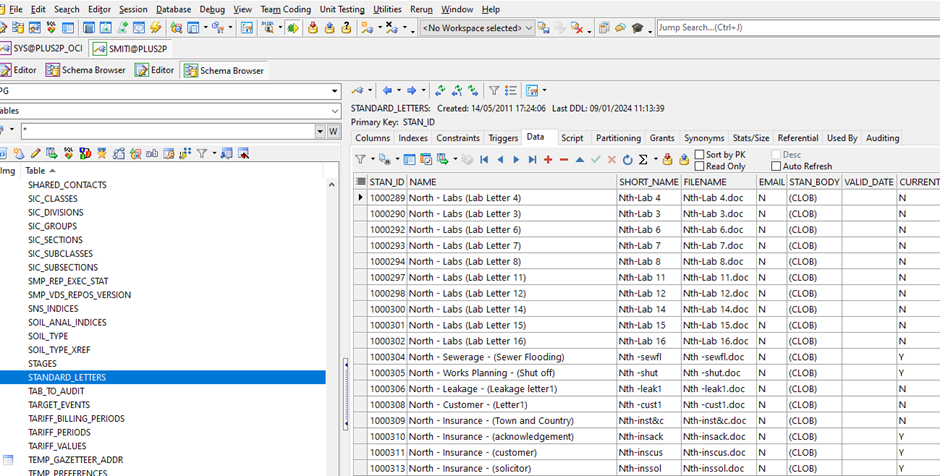
Strategy -  installaltion  £600 letter …etc

However, we still need to generate the insert statement to insert the problem row to the table.

The easy option is to use Toad and select the table from the schema browser


From the export dataset button use the drop-down option and select “create insert statement”


You need to include the where clause for each of the offending rows –


This generates -

SET DEFINE OFF;
Insert into STANDARD_LETTERS
(STAN_ID, NAME, SHORT_NAME, FILENAME, EMAIL,
STAN_BODY, VALID_DATE, CURRENT_VALID, PREVIEW, DOC_SOURCE,
STAN_COVLET_STAN_ID)
Values
(100, 'Strategy -  installaltion > £600 letter', 'MS8', 'MS8.doc', 'N',
'', TO_DATE('02/04/2009 12:06:33', 'DD/MM/YYYY HH24:MI:SS'), 'Y', NULL, NULL,
NULL);
COMMIT;


However :

SQL> Insert into STANDARD_LETTERS;

(STAN_ID, NAME, SHORT_NAME, FILENAME, EMAIL,
STAN_BODY, VALID_DATE, CURRENT_VALID, PREVIEW, DOC_SOURCE,
STAN_COVLET_STAN_ID)
Values
(100, 'Strategy -  installaltion > £600 letter', 'MS8', 'MS8.doc', 'N',
'', TO_DATE('02/04/2009 12:06:33', 'DD/MM/YYYY HH24:MI:SS'), 'Y', NULL, NULL,
NULL);
(1001077, 'Strategy -  installaltion > £600 letter', 'MS8', 'MS8.doc', 'N',
*

ERROR at line 6:
ORA-12899: value too large for column "ABC"."STANDARD_LETTERS"."NAME" (actual:
51, maximum: 50)


Which is the error we are seeing in datapump – not surprising.

Removing the offending “£” (tempted to correct the spelling of installation!)

We could have changed the datatype on the column to insert the pound but left “as is” to demonstrate the process.

SQL> Insert into STANDARD_LETTERS
(STAN_ID, NAME, SHORT_NAME, FILENAME, EMAIL,
STAN_BODY, VALID_DATE, CURRENT_VALID, PREVIEW, DOC_SOURCE,
STAN_COVLET_STAN_ID)
Values
(100, 'Strategy - installaltion > 600 letter', 'MS8', 'MS8.doc', 'N',
'', TO_DATE('02/04/2009 12:06:33', 'DD/MM/YYYY HH24:MI:SS'), 'Y', NULL, NULL,
NULL);


1 row created.

After running the above for all the offending rows - on checking the row counts (as expected).

SQL> select count(*) from ABC.AFFECTED_ADDRESSES;

COUNT(*)
----------
10799944

SQL> select count(*) from ABC.STANDARD_LETTERS;

COUNT(*)
----------
1146


Ensure to test on the test environment prior to updating any prod database,

This is quite a simple example and worth further reading - any comments please let me know.

I may update this with a scripted solution and provide further detail going forward.

Linux port creating / testing


Wanted to test Oracle Apex on port 8080 (default) but was not 100% sure Apex was running correctly or the firewall from the cloud was not blocking the port.

The "nc" command can run the port and you can test without having the app running -

[root@test ~]# nc -l 8080 -v

Ncat: Version 7.50 ( https://nmap.org/ncat )

Ncat: Listening on :::8080

Ncat: Listening on 0.0.0.0:8080


This is particularly handy as the  Oracle cloud servers have no web browser graphical output (OCI Linux ones anway - as far as I know) so not like you can fire up a web browser and connect that way.

Example of port testing -

[root@tst01]# ncat -z -v tst02.oci.nwl.co.uk 3872

Ncat: Version 7.50 ( https://nmap.org/ncat )

Ncat: Connection timed out.

[root@tst01]# ncat -z -v tst03.oci.nwl.co.uk 3872

Ncat: Version 7.50 ( https://nmap.org/ncat )

Ncat: Connected to 10.157.249.4:3872.

Ncat: 0 bytes sent, 0 bytes received in 0.02 seconds.


Autonomous Database - comments

Changing time zone

Default Autonomous Database Time Zone

The default Autonomous Database time zone is Coordinated Universal Time ‎(UTC)‎ and by default calls to SYSDATE and SYSTIMESTAMP return the date and time in UTC.

In order to change database time zone, you can run the following statement. 

This example sets the database time zone to UTC-5.

ALTER DATABASE SET TIME_ZONE='-05:00';

Note:

You must restart the Autonomous Database instance for the change to take effect.
After you set the database time zone, by default SYSDATE and SYSTIMESTAMP continue to return date and time in UTC (SYSDATE_AT_DBTIMEZONE is FALSE by default). If you set SYSDATE_AT_DBTIMEZONE to TRUE in a session, SYSDATE and SYSTIMESTAMP return the database time zone.


Stopping Global cache blocks lost metric


From Metalink


https://support.oracle.com/epmos/faces/DocumentDisplay?id=2543134.1&displayIndex=1


SOLUTION

cd <OMS_HOME>/bin

$emcli login -username=sysman

$emcli sync

$emcli modify_collection_schedule -targetType="oracle_database" -targetNames="<DBInstanceName>" -collectionName="rac_global_cache_10i" -collectionStatus=Disabled -preview="N"

Real world example

[oracle@oms1 bin]$ $OMS_HOME/bin/emcli login -username=sysman -password=.......

Login successful

[oracle@oms1 bin]$ $OMS_HOME/bin/emcli sync

Synchronized successfully

[oracle@oms1 bin]$ emcli modify_collection_schedule -targetType="oracle_database" -collectionName="rac_global_cache_10i" -collectionStatus=Disabled -preview="N" -targetNames="DemoDB"

Collection Name : rac_global_cache_10i

DemoDB : Collection Schedule updated successfully.

The collection schedule of the following metrics might be affected :

rac_global_cache


DBCLI quick notes

Quick notes re dbcli commands - 

[root@ ~]# dbcli describe-system

DbSystem Information
----------------------------------------------------------------
ID: c13eb0d0-...........
Platform: Vmdb
Data Disk Count: 8
CPU Core Count: 2
Created: August 3, 2022 4:49:59 PM BST

System Information
----------------------------------------------------------------
Name: gi2iuoaa
Domain Name: s003.ldntier4prd.oraclevcn.com
Time Zone: Europe/London
DB Edition: EeHp
DNS Servers:
NTP Servers: 169........

Disk Group Information
----------------------------------------------------------------
DG Name Redundancy Percentage
------------------------- ------------------------- ------------
Data External 100
Reco External 100

[root@~]# dbcli describe-database --dbName TIER......

#
Database details
----------------------------------------------------------------
ID: 24d80124-c9da-4037-b077-a9...
Description: TIER4P
DB Name: TIER4P
DB Version: 19.16.0.0.0
DB Type: Si
DB Edition: EE_HP
DBID: 2309127357
Instance Only Database: false
CDB: true
PDB Name: LLINKP
PDB Admin User Name: pdbuser
Class: Oltp
Shape:
Storage: ASM
DB Redundancy:
CharacterSet: AL32UTF8
National CharacterSet: UTF8
Language: AMERICAN
Territory: AMERICA
Home ID: bad88939-ce80-4691-9783-0f6ac6bedef8
Console Enabled: false
Level 0 Backup Day: Sunday
AutoBackup Enabled: false
Created: August 3, 2022 4:50:00 PM BST
DB Domain Name: s003.ldntier4prd.oraclevcn.com


[root@ ~]# dbcli list-dbstorages

ID Type DBUnique Name Status
---------------------------------------- ------ -------------------- ----------
2c5c6fe0-4497-ecc Asm TIm Configured

[root@ ~]# dbcli describe-dbstorage -i 2c5c6fe0-4497-ecc

Database Storage details
----------------------------------------------------------------
ID: 2c5c6fe0-4497-
DB Name: TIER4P
DBUnique Name: TIER4P_lhr2rm
DB Resource ID: 24d80124-c9da-40
Storage Type: ASM
DATA:
Location: +DATA/TIER4P_lhr2rm
Used Space: 993.42GB
Free Space: 3.02TB
REDO:
Location: +RECO/TIER4P_lhr2rm
Used Space: 36.98GB
Free Space: 782.88GB
RECO:
Location: +RECO/TIER4P_lhr2rm
Used Space: 36.98GB
Free Space: 782.88GB
State: ResourceState(status=Configured)
Created: August 3, 2022 4:50:01 PM BST
UpdatedTime: August 3, 2022 5:06:46 PM BST

[root@ ~]# dbcli describe-database --dbid 24d80124..................

Database details
----------------------------------------------------------------
ID: 24d80124-c...
Description: TIER4P
DB Name: TIER4P
DB Version: 19.16.0.0.0
DB Type: Si
DB Edition: EE_HP
DBID: 2309127357
Instance Only Database: false
CDB: true
PDB Name: LLINKP
PDB Admin User Name: pdbuser
Class: Oltp
Shape:
Storage: ASM
DB Redundancy:
CharacterSet: AL32UTF8
National CharacterSet: UTF8
Language: AMERICAN
Territory: AMERICA
Home ID: bad88939-c
Console Enabled: false
Level 0 Backup Day: Sunday
AutoBackup Enabled: false
Created: August 3, 2022 4:50:00 PM BST
DB Domain Name: s003.ldntier4prd.oraclevcn.com

[root@prd01tier4-dbs ~]# dbcli list-dbhomes

ID Name DB Version Home Location Status

------------------ ---------------------------------------- --------------------------------------------- ----------

........9000_home1 19.16.0.0.0 /u01/app/oracle/product/19.0.0.0/dbhome_1 Configured


[root@ ~]# dbcli describe-dbhome -i ......

DB Home details
----------------------------------------------------------------
ID: bad88939-
Name: OraDB19000_home1
Version: 19.16.0.0.0
Home Location: /u01/app/oracle/product/19.0.0.0/dbhome_1
Status: Configured
Created: August 3, 2022 4:50:00 PM BST
Database Edition: EE_HP
Unified Auditing: false


Oracle "Floating" Services

Running a two node RAC 19c cluster.

Also, running a two node Data Guard 19c environment to provide resilience for the primary environment.

If you were to do a Data Guard switch you would need to manually change any connection strings to reflect the fact that that Data Guard environment is the "new" primary otherwise applications or SQL Developer / TOAD etc will be pointing to the "original" i.e now standby side.

However, there is a way to have your connections "float" between your Primary and Secondary environments. 

Please note - SCAN listeners, RAC, DataGuard, TDE etc outside of this post.

++++++++++++++++++++

Example values - very simplistic setup for clarity :

ENV_lhr34g - database. ENV1 & ENV2 (RAC instances)    - pdbs read write

ENV_lhr456 - database. ENV1 & ENV2 (Data Guard env)  - pdbs read only (active dataguard)

TEST - pluggable database

TSTS - pluggable database service (example)

db-1 & db2 (two nodes on 'Primary' side) 

db-3 & db-4 (two nodes on 'Secondary' i.e. 'DataGuard' side)

Remember after "switch over" these will swap.

env1-scan.example.com - SCAN listener name on primary

env2-scan.example.com - SCAN listener name on secondary (Data Guard side)

++++++++++++++++++++

Added the service (after a bit of trial and error with syntax and options) -

[oracle@db-1 ~]$ srvctl add service -d ENV_lhr34g -s TSTS -pdb TEST -l primary -r "ENV1,ENV2"

Started the service -

[oracle@db-1 ~]$ srvctl start service -service TSTS -db ENV_lhr34g

Check

[oracle@db-1 ~]$ srvctl status database -db ENV_lhr34g -v

Instance ENV1 is running on node db-1 with online services TSTS. Instance status: Open.
Instance ENV2 is running on node db-2 with online services TSTS. Instance status: Open.

Added a "TEST" entry to the tnsnames.ora on both primary nodes to test connection.

You can confirm which service is running against which pdb by running the following - 

select name, con_id from v$active_services order by 1

or 

SQL> select a.name, a.con_id, b.name from v$active_services a, v$pdbs b where a.CON_ID = b.con_id order by 2


NAME CON_ID NAME
-------   ---------- ---------
TSTS 2 TEST

Amended a default entry in the tnsnames.ora - you might want to adjust this entry to suit your environment.

TEST =(DESCRIPTION=(SDU=65535)(SEND_BUF_SIZE=10485760)(RECV_BUF_SIZE=10485760)(ADDRESS_LIST=(FAILOVER = ON)(LOAD_BALANCE = OFF)(ADDRESS=(PROTOCOL=TCP)(HOST=env1-scan.example.com)(PORT=1521)) (ADDRESS = (PROTOCOL = TCP)(HOST = env2-scan.example.com)(PORT = 1521)))(CONNECT_DATA=(SERVER=DEDICATED)(SERVICE_NAME=TSTS.example.com)))

Login with that entry

sqlplus user1/password@TEST

SQL> select host_name from gv$instance where instance_number=userenv('instance');

HOST_NAME
----------------------------------------------------------------
db-1

Trying logging in and out a few times and SCAN listener will point you to either db-1 or db-2

Now amend the Data Guard side 

Add an entry on the DataGuard side but do not start the service - note the database name is the one on the DataGuard side.

[oracle@db-3 ~]$ srvctl add service -d ENV_lhr456 -s TSTS -pdb TEST -l primary -r "ENV1,ENV2"

DO NOT start the service this will happen when you do a switchover !

(If you try and start the service prior to switching over it will fail with an error and the only way to start it, is to stop the service on the primary first and then start the service on the Data Guard side. However, that would mean  you would connect to the read only pdb on the Data Guard side and not the primary database. One way to ensure you always connect to the primary is to change the ordering of the HOST= option in the service name in the tnsnames.ora file so that the connection is correct - something I have not had a chance to try but may update this at a later date. If you do want to connect to the read only pdb on the secondary suggest an alternative service name is created. For simplicity suggest the service is only started on the primary - let the dataguard switchover look after it).

Add a tnsnames entry as per the primary side on both Data Guard nodes.

As the grid user you might want to run "crsctl stat res -t" to check the status of the services.

e.g. 

ora.env_lhr346.tsts.svc

1 OFFLINE OFFLINE STABLE
2 OFFLINE OFFLINE STABLE

Will be "online online" if this is primary

To confirm your pdb connection is working simply do a Data Guard switchover (outside of the scope of this ) but for Oracle cloud simply a case of going into the Cloud console and enabling switchover.

Once the switchover is complete - again check the connection but this time, the sqlplus connection will report the "new" primary (try logging in and out a few times to confirm you see db-3 and db-4 the new servers you should be connecting to). 

Also check "crsctl stat res -t" as above to confirm the service is now online.


sqlplus user1/password@TEST

SQL> select host_name from gv$instance where instance_number=userenv('instance');

HOST_NAME
----------------------------------------------------------------
db-3

SQL> show con_name;

CON_NAME
------------------------------
TEST

 As always, any improvements, amendments or correction please let me know and always test on a "sandbox" environment prior to any production changes.


ORA-02266: Unique/Primary Keys In Table Referenced While Truncating Table


Trying to do a data only import into a table and hitting the error below :

ORA-39120: Table "XYZ"."LOOKUPS" can't be truncated, data will be skipped. Failing error is:

ORA-02266: unique/primary keys in table referenced by enabled foreign keys

The primary key in the table( which we are truncating) , seems to be referring to a another child table with foreign key.

Run below script to get the parent table , child table relation


set lines 200

COL CHILD_TABLE FOR a50
col CONSTRAINT_NAME for a50
col owner form a40
col FK_column form a40
col table_name form a50

select b.owner, b.table_name child_table,  c.column_name FK_column, b.constraint_name
    from dba_constraints a, dba_constraints b, dba_cons_columns c
    where a.owner=b.r_owner
    and b.owner=c.owner
    and b.table_name=c.table_name
    and b.constraint_name=c.constraint_name
    and a.constraint_name=b.r_constraint_name
    and b.constraint_type='R'
  and a.owner='&owner'
   and a.table_name='&table_name'
  and a.CONSTRAINT_TYPE='P'


Enter the values and then do a manual - alter table disable constraint.

For tables with multiple constraints this is easier i.e.
  
 select 'alter table ' || owner || '.' || table_name || ' disable constraint ' || constraint_name ||';' stmt from all_constraints
  where r_constraint_name in (select constraint_name from all_constraints where table_name = 'LOOKUPS')

Run the output - remember to enable the constraints when complete - the db I was doing this was restricted so no issue of any others "hitting" the tables.

Import should now work.

New user - linux password issue


Hit a problem today changing  a new user password today in Linux.

[root@prd01oua-dbg2 ~]# passwd emcadm

Changing password for user emcadm.

passwd: Authentication token manipulation error

[root@prd01oua-dbg2 pam.d]# ls -ls system-auth

4 -rw-r--r-- 1 root root 1205 Feb  2 10:51 system-auth

In system.auth

password    requisite     pam_pwquality.so try_first_pass local_users_only retry=3 authtok_type=

#password    sufficient    pam_unix.so md5 shadow nullok try_first_pass use_authtok

password    required      pam_deny.so

change to

password    requisite     pam_pwquality.so try_first_pass local_users_only retry=3 authtok_type=

password    sufficient    pam_unix.so md5 shadow nullok try_first_pass use_authtok

password    required      pam_deny.so

Next we hit a password length problem

[root@prd01oua-dbg2 pam.d]# passwd emcadm

Changing password for user emcadm.

New password:

BAD PASSWORD: The password is shorter than 15 characters

/etc/security/pwquality.conf

# Password Minimum Length should be configured

minlen=8


Changing password for user emcadm.

New password:

Retype new password:

passwd: all authentication tokens updated successfully.

[root@prd01oua-dbg1 security]#

Et voilla.....


Weblogic Version

Needed to quickly check the Weblogic version that I was using - quick notes.

From $WL_HOME/server/lib run this :

[oracle@dev01-wls-1 lib]$ pwd

/u01/app/oracle/products/fmw_12214/wlserver/server/lib

[oracle@dev01-wls-1 lib]$ java -cp weblogic.jar weblogic.version -version -verbose

WebLogic Server 12.2.1.4.0 Thu Sep 12 04:04:29 GMT 2019 1974621 ImplVersion: 12.2.1.4.0

Oracle Security Developer Tools Security Engine ImplVersion: 3.1.0

Oracle Security Developer Tools Crypto ImplVersion: 3.1.0

Oracle Universal Connection Pool ImplVersion: 19.3.0.0.0

etc...

There are other ways to check the version but this seems to the easiest and most comprehensive.

Download :


Clone / Refresh of a PDB from remote database

Using the note from here -

https://oracle-base.com/articles/12c/multitenant-clone-remote-pdb-or-non-cdb-12cr1

"Oracle-Base" always excellent but please check this note on Metalink and the note below if using TDE.

Cloning PDB From PDB Fails With ORA-28357: Password Required To Open The Wallet (Doc ID 2415131.1)

Example database ORAPDB and example password used. 

++++++++++++++++++++++++++++++

[oracle@dev01tier2-dbs admin]$ sqlplus / as sysdba

 SQL*Plus: Release 19.0.0.0.0 - Production on Fri Jul 30 12:25:22 2021

Version 19.9.0.0.0

Copyright (c) 1982, 2020, Oracle.  All rights reserved.

Connected to:

Oracle Database 19c EE High Perf Release 19.0.0.0.0 - Production

Version 19.9.0.0.0

 SQL> DROP DATABASE LINK clone_link;

DROP DATABASE LINK clone_link

                *

ERROR at line 1:

ORA-02024: database link not found

 SQL> CREATE DATABASE LINK clone_link CONNECT TO remote_clone_user IDENTIFIED BY remote_clone_user USING 'ORAPDB';

 Database link created.

 SQL> DESC user_tables@clone_link

 Name                                      Null?    Type

----------------------- -                  -------- ------------

 TABLE_NAME                                NOT NULL VARCHAR2(128)

 TABLESPACE_NAME                                    VARCHAR2(30)

 …etc

 HAS_SENSITIVE_COLUMN                               VARCHAR2(3)

 ADMIT_NULL                                         VARCHAR2(3)

 DATA_LINK_DML_ENABLED                              VARCHAR2(3)

 LOGICAL_REPLICATION                                VARCHAR2(8)

 SQL> show pdbs

  CON_ID CON_NAME                       OPEN MODE  RESTRICTED

---------- ------------------------------ ---------- ----------

         2 PDB$SEED                       READ ONLY  NO

         3 RADND                          READ WRITE NO

         4 RADARPDB                       READ WRITE NO

         5 ORAPDB                         READ ONLY  NO

SQL> drop pluggable database ORAPDB including datafiles;

drop pluggable database ORAPDB including datafiles

*

ERROR at line 1:

ORA-65025: Pluggable database ORAPDB is not closed on all instances.

  // Will try anyway to create to show error

SQL> CREATE PLUGGABLE DATABASE ORAPDB FROM ORAPDB@clone_link;

CREATE PLUGGABLE DATABASE SFSD FROM ORAPDB@clone_link

*

ERROR at line 1:

ORA-65012: Pluggable database ORAPDB already exists.

SQL> alter pluggable database ORAPDB close IMMEDIATE;

Pluggable database altered.

SQL> drop pluggable database ORAPDB including datafiles;

Pluggable database dropped.

 // Now we can create but...

SQL> CREATE PLUGGABLE DATABASE ORAPDB FROM ORAPDB@clone_link;

CREATE PLUGGABLE DATABASE ORAPDB FROM ORAPDB@clone_link

*

ERROR at line 1:

ORA-46697: Keystore password required.

// See Doc ID 2415131.1

  SQL> CREATE PLUGGABLE DATABASE ORAPDB FROM ORAPDB@clone_link keystore IDENTIFIED BY "Password#2021#";

 Pluggable database created.

 SQL> l

  1* SELECT name, open_mode FROM v$pdbs

SQL> /

 NAME                                     OPEN_MODE

---------------------------------------- ----------

PDB$SEED                                 READ ONLY

RADND                                    READ WRITE

RADARPDB                                 READ WRITE

ORAPDB                                   MOUNTED


SQL> ALTER PLUGGABLE DATABASE ORAPDB OPEN;

 Pluggable database altered.

 SQL> show pdbs

     CON_ID CON_NAME                       OPEN MODE  RESTRICTED

---------- ------------------------------ ---------- ----------

         2 PDB$SEED                       READ ONLY  NO

         3 RADND                          READ WRITE NO

         4 RADARPDB                       READ WRITE NO

         5 ORAPDB                         READ WRITE NO

 SQL> alter session set container = ORAPDB;

Session altered.

 //Remember to perform sanity check against pdb - check for invalid  objects etc..

 1* select owner, object_type, count(object_type) from dba_objects where status != 'VALID' group by owner, object_type order by 1,2

SQL> /

 OWNER      OBJECT_TYPE             COUNT(OBJECT_TYPE)

---------- ----------------------- ------------------

ABC        FUNCTION                                 4

ABC        PACKAGE BODY                             1

2 rows selected.